Managing multiple social media platforms — whether for yourself or for a brand — means juggling a lot at once. On any given day, you are creating posts, repurposing content, staying on top of trends, reviewing detailed analytics, and more.
If you’re a creator or a small business owner managing your social media presence yourself, all of this is in addition to running your business. The good news is that there are plenty of social media management tools that can lighten the load — and maybe even make the work feel less like work.
Key Takeaways
- Best for creators and small business: Buffer remains the top choice for small businesses due to its simplicity and affordable per-channel pricing.
- Best for enterprise: Sprinklr and Sprout Social offer robust features for large organizations, including advanced social listening and influencer marketing integrations, though this comes with a hefty price tag.
- Niche specialization: Use Tailwind for Pinterest-heavy strategies and Oktopost for B2B buyer-journey tracking.
- Automation trends: Tools like Manychat are helpful for high-volume DM and comment automation to drive lead conversion.
- Scalability: When choosing a tool, calculate the per-user or per-channel cost at your projected 12-month growth to avoid sudden budget spikes.
- Pricing varies widely: Entry-level plans start around $6 to $20 per month, while enterprise tools can run into hundreds or require custom quotes. Many platforms feature pricing models that adjust based on the number of users or social accounts.
- Testing them out: Most social media management platforms offer a free trial or a limited free plan, allowing you to test the software before committing to a paid subscription.
Here is a quick summary of all 11 tools:
| Tool | Free Plan / Trial | Latest Public Price | Best For | Top Features |
|---|---|---|---|---|
| Buffer | Free for up to 3 channels | $6/month per channel | Creators and small businesses | Smart scheduling, universal comment inbox, idea storage, analytics, optimal time recommendations, AI assistant, posting streaks |
| Hootsuite | 30-day free trial | $199/month per user | Mid-sized teams and social listening | Scheduling, analytics, team access controls |
| Tailwind | Free plan available | $29.99/month | Pinterest and small social accounts | Pin scheduling, browser pin extension, post queueing |
| SocialPilot | 14-day free trial | $30/month | Solo professionals to small teams | Scheduling, content library, collaboration; higher tiers add analytics and white-label |
| Zoho Social | Trial available | $15/month | Users in Zoho ecosystem | Integrated social and CRM tools, scheduling and editing |
| Sprout Social | 30-day trial | $199/month per user | Teams needing advanced analytics and influencer tools | Unified inbox, analytics, social CRM, team collaboration |
| Oktopost | Not publicly available | Custom / enterprise pricing | B2B companies and enterprises | Campaign dashboards, buyer-journey tracking, content and advocacy management |
| Later | 14-day free trial | $25/month | Agencies and content schedulers | Media library, scheduling and posting across channels, content planning support |
| Socialinsider | 14-day trial | $99/month | Analytics-focused social media users and teams | Competitor and content-pillar performance analytics, dashboards |
| Manychat | Limited-feature plan | $15/month | Chat automation and DMs | Automated DMs, template campaigns, AI-guided workflow setup |
| Sprinklr | Enterprise tool — custom quote only | Custom / enterprise pricing | Large enterprises and brands with complex needs | Persona dashboards, multi-audience content, AI-based image detection, and social analytics |
1. Buffer
Best social media management tool for creators and small businesses
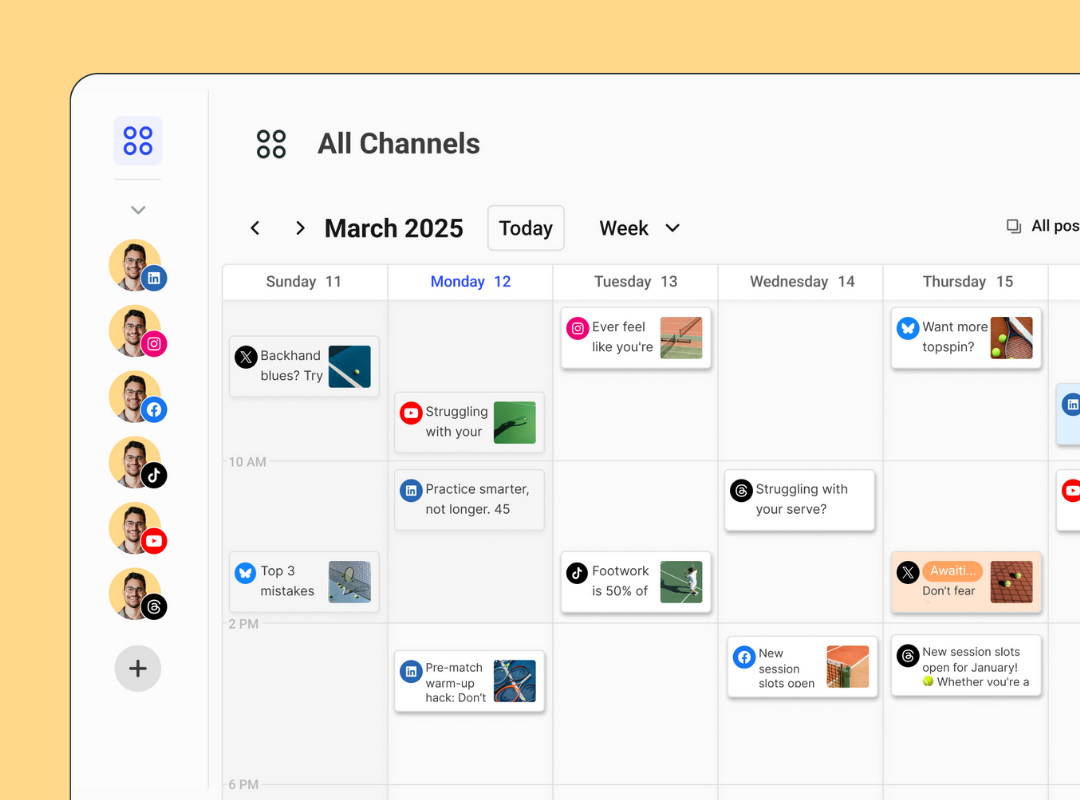
Buffer is often seen as the best plug-and-play social media tool, thanks to its easy-to-use system, low barrier to entry, and per-channel pricing flexibility.
Favorite features:
- Smart scheduling recommends the best times for you to post, based on an analysis of the latest engagement data — no more guessing when to post.
- Store ideas, curated content, and any notes on the go using the Create space.
- Community is a single hub for managing and replying to all of your comments.
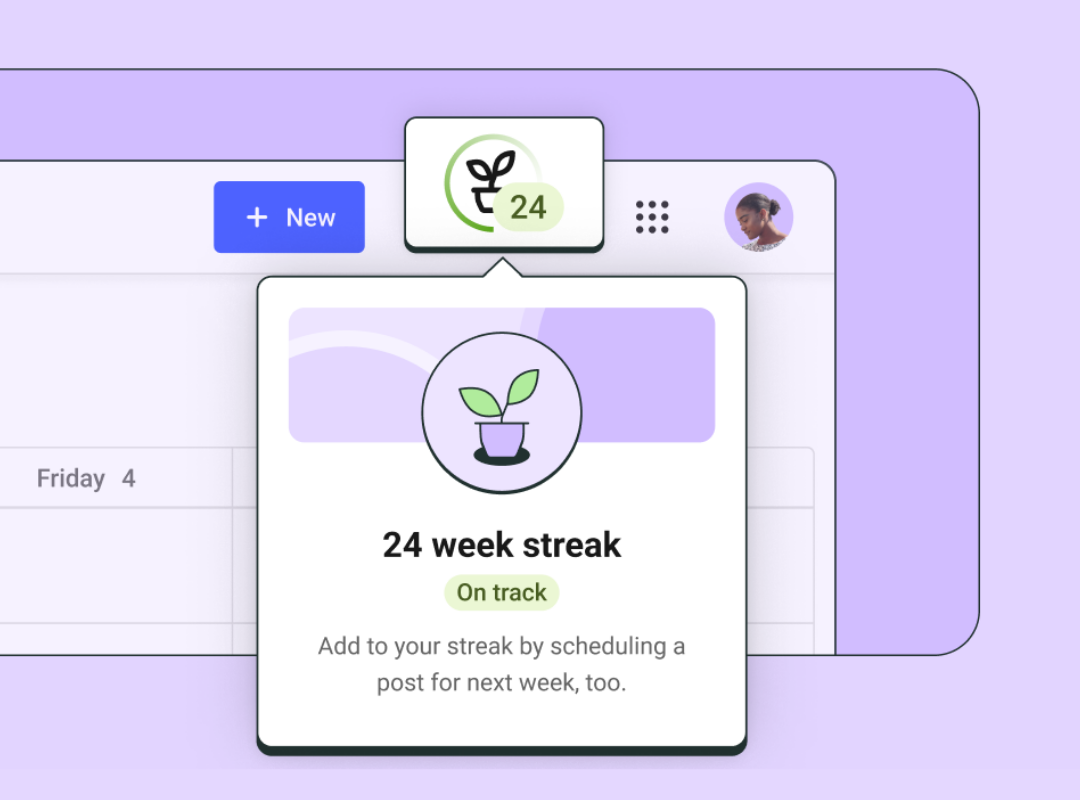
- The Streaks feature helps you build and maintain a consistent posting habit.
- The Start Page lets you create a customizable landing page that replaces generic link-in-bio tools.
The thing that stands out most about Buffer is its simplicity. On the surface, it looks straightforward: add your social media accounts, start scheduling, and you’re off and running. But that’s just the beginning. Once you start exploring, you’ll find Buffer can do a whole lot more.
- You can store social media post ideas on the go using the smooth, accessible mobile app.
- You can manage and respond to all of your comments in a single, organized space.
- You can create branded social media reports for stakeholders and get metrics tailored to you — including when you get the most engagement and which posts deliver the best results.
- You can build a customized landing page in minutes.
Buffer is also quick to adapt when new platforms emerge. With new social channels launching rapidly — including Threads and Bluesky — it helps to have a tool that’s flexible and fast.
It’s one of the few social media scheduling tools with habit-building features like streaks to help you post consistently.
Buffer also includes a template library to spark content ideas, especially when you’re short on time. You can schedule posts easily, respond to comments, use its AI assistant to help speed up content creation and generate captions, and collaborate with your team.
Buffer works best for creators and small teams who value simplicity and flexibility over enterprise-level complexity.
Free plan/trial available: Yes. Free forever for up to three channels. All paid plans also have a 14-day free trial.
Price: Paid plans begin at $6 per month per channel.
2. Hootsuite
Best social media management tool for mid-sized teams and social listening
Hootsuite is one of the most widely recognized social media management platforms, offering a broad feature set suited to mid-sized teams that need scheduling, analytics, and team access controls in one place.
Key features:
- Post scheduling and calendar management across multiple platforms
- Analytics and performance reporting
- Team access controls and content approval workflows
- Social listening capabilities
Free plan/trial available: 30-day free trial.
Price: $199 per month per user.
3. Tailwind
Best social media management tool for Pinterest-focused strategies
Tailwind is built with Pinterest and Instagram in mind, making it a strong choice for creators and small businesses that rely heavily on visual content and pin scheduling.
Key features:
- Pin scheduling and browser pin extension
- Post queueing for Instagram and Pinterest
- SmartSchedule to optimize posting times
Free plan/trial available: Free plan available.
Price: $29.99 per month.
4. SocialPilot
Best social media management tool for solo professionals and small teams
SocialPilot offers solid scheduling and collaboration features at a competitive price point, with higher-tier plans adding analytics and white-label options suited to agencies.
Key features:
- Post scheduling and content library
- Team collaboration tools
- Analytics and white-label reporting on higher tiers
Free plan/trial available: 14-day free trial.
Price: $30 per month.
5. Zoho Social
Best social media management tool for users in the Zoho ecosystem
Zoho Social integrates tightly with Zoho’s broader suite of business tools, including its CRM, making it a natural fit for teams already using Zoho products.
Key features:
- Scheduling and post editing
- CRM integration with Zoho
- Monitoring and engagement tools
Free plan/trial available: Trial available.
Price: $15 per month.
6. Sprout Social
Best social media management tool for teams needing advanced analytics
Sprout Social is a feature-rich platform designed for teams that need deep analytics, a unified inbox, and social CRM capabilities, along with influencer marketing integrations.
Key features:
- Unified inbox for managing all social messages
- Advanced analytics and reporting
- Social CRM and team collaboration tools
- Influencer marketing integrations
Free plan/trial available: 30-day trial.
Price: $199 per month per user.
7. Oktopost
Best social media management tool for B2B enterprises
Oktopost is purpose-built for B2B organizations, offering campaign dashboards and buyer-journey tracking that tie social media activity to business outcomes.
Key features:
- Campaign dashboards and buyer-journey tracking
- Content and employee advocacy management
- Integration with B2B marketing and CRM platforms
Free plan/trial available: Not publicly available.
Price: Custom enterprise pricing.
8. Later
Best social media management tool for agencies and content schedulers
Later is a visual content planning tool that works well for agencies and teams managing high volumes of scheduled content across multiple channels.
Key features:
- Media library for organizing visual assets
- Scheduling and auto-publishing across channels
- Content planning and calendar support
Free plan/trial available: 14-day free trial.
Price: $25 per month.
9. Socialinsider
Best social media management tool for analytics-focused teams
Socialinsider is built primarily around analytics, offering deep competitor analysis and content-pillar performance tracking for teams that prioritize data-driven decisions.
Key features:
- Competitor analysis and benchmarking
- Content-pillar performance analytics
- Custom dashboards and reporting
Free plan/trial available: 14-day trial.
Price: $99 per month.
10. Manychat
Best social media management tool for chat automation and DMs
Manychat specializes in automating direct messages and comment responses, making it particularly useful for businesses that rely on social media conversations to drive leads and conversions.
Key features:
- Automated DM and comment workflows
- Template-based campaigns
- AI-guided workflow setup
Free plan/trial available: Limited-feature free plan available.
Price: $15 per month.
11. Sprinklr
Best social media management tool for large enterprises
Sprinklr is an enterprise-grade platform built for large organizations managing complex, multi-audience social media strategies at scale.
Key features:
- Persona dashboards and multi-audience content management
- AI-based image detection and content moderation
- Advanced social analytics and listening
- Unified customer experience management
Free plan/trial available: Enterprise tool — custom quote only.
Price: Custom enterprise pricing.
What Should You Look for in Social Media Management Apps?
When evaluating social media management tools, the right choice depends on your specific needs, team size, and budget. Here are the key factors to consider:
- Supported platforms: Make sure the tool connects to all the social networks you use, including any newer platforms you may be expanding to.
- Scheduling and publishing: Look for flexible scheduling options, including bulk scheduling, calendar views, and auto-publishing.
- Analytics and reporting: Consider how much data you need. Some tools offer basic engagement metrics, while others provide deep competitor analysis and custom dashboards.
- Team collaboration: If you work with others, look for features like approval workflows, role-based access, and shared content libraries.
- Inbox and engagement management: A unified inbox for managing comments, DMs, and mentions across platforms can save significant time.
- Pricing model: Pay close attention to whether pricing is per user, per channel, or flat-rate — and calculate the cost at your projected 12-month growth to avoid unexpected budget increases.
- Free trial availability: Most platforms offer a free trial or limited free plan, so take advantage of these before committing to a paid subscription.
FAQ About Social Media Management Tools
What is a social media management tool? A social media management tool is software that allows individuals, teams, or businesses to plan, schedule, publish, and analyze content across multiple social media platforms from a single dashboard.
Which social media management tool is best for small businesses? Buffer is widely considered the best option for small businesses and creators, thanks to its simple interface, per-channel pricing, and generous free plan that supports up to three channels.
Are there free social media management tools? Yes. Several tools offer free plans, including Buffer (up to three channels), Tailwind, and Manychat. Most paid platforms also offer free trials ranging from 14 to 30 days.
What is the difference between Buffer and Hootsuite? Buffer is designed for simplicity and is best suited to creators and small teams, with pricing starting at $6 per month per channel. Hootsuite offers more advanced features for mid-sized teams but starts at $199 per month per user, making it a significantly larger investment.
Do I need an enterprise tool for advanced analytics? Not necessarily. Tools like Socialinsider offer enterprise-level analytics at $99 per month without requiring a full enterprise contract. Enterprise platforms like Sprinklr and Sprout Social are better suited for large organizations with complex, multi-team needs.
The right social media management tool depends on where you are today and where you expect to grow. Starting with a free plan or trial is the best way to find the tool that fits your workflow before making a financial commitment.